Lighting Grids & Room Lux Mapping

The lighting grid tools in Lux Meter Pro let you build a room grid, tap each cell to record measured lux, and instantly see total and average lux for the whole area. Perfect for planning a new install or checking how well an existing layout really performs.

8Γ—8+ Flexible Grids Add / Remove Rows & Columns Total & Average Lux PDF Heat‑Map Export

Why Use Lighting Grids?

Grids give you a structured way to measure and visualise how light is distributed across a room, not just at a single point.

1. Create a Grid for Your Room

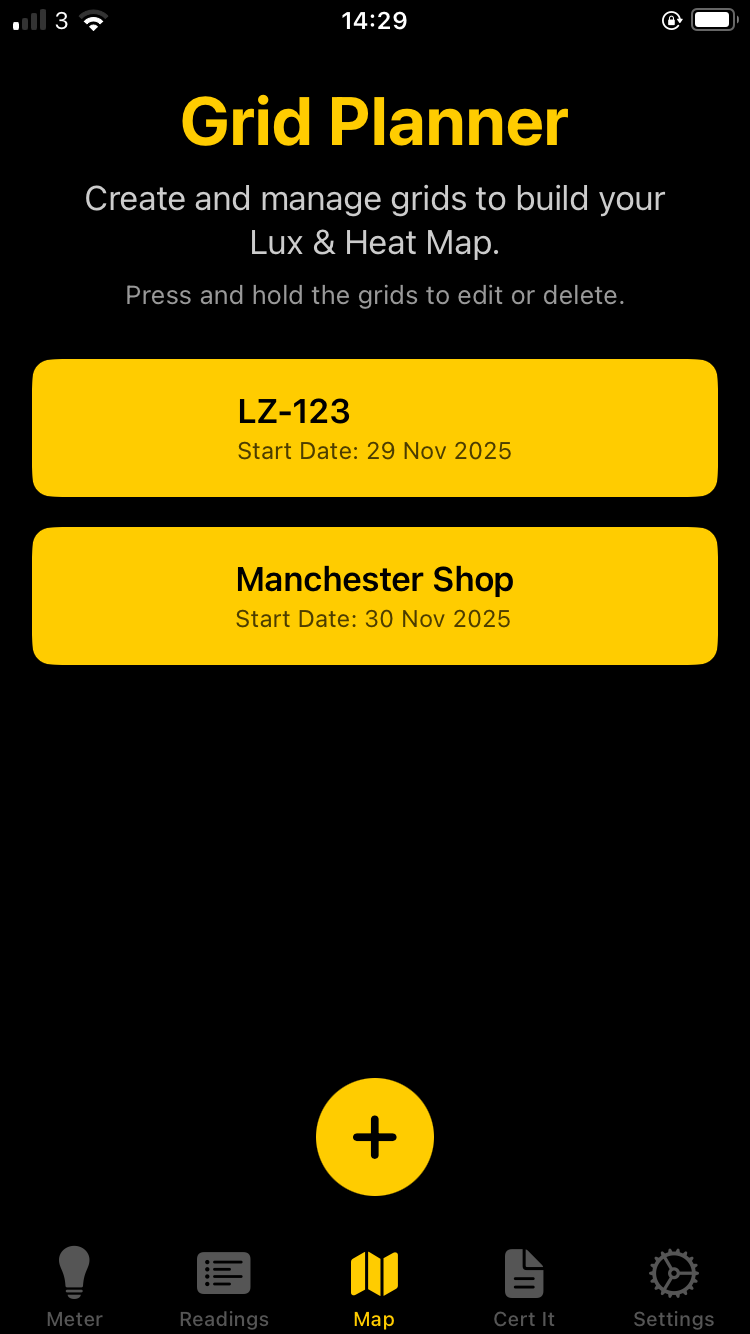
Start by creating a new grid for the room you’re assessing. Give it a job reference and basic address details so your lux map is always tied back to a real project and location.

Define the job and grid ID

In the app, the CreateGridView screen lets you create a new lighting grid with:

  • Job reference – a name you recognise (project, room, client).
  • Business/Resident name and address – for clear reporting.
  • Automatic Grid ID – a unique ID (UUID) stored as gridId used to link your CSV data and PDF reports to this grid.
  • Start date – when you began the survey or design work.

When you tap β€œCreate”, Lux Meter Pro:

  • Saves the grid metadata into a local grids.json file.
  • Creates a matching gridId.csv with row/column placeholders for lux values.
Create grid screen in Lux Meter Pro

2. Tap Cells & Record Lux Across the Room

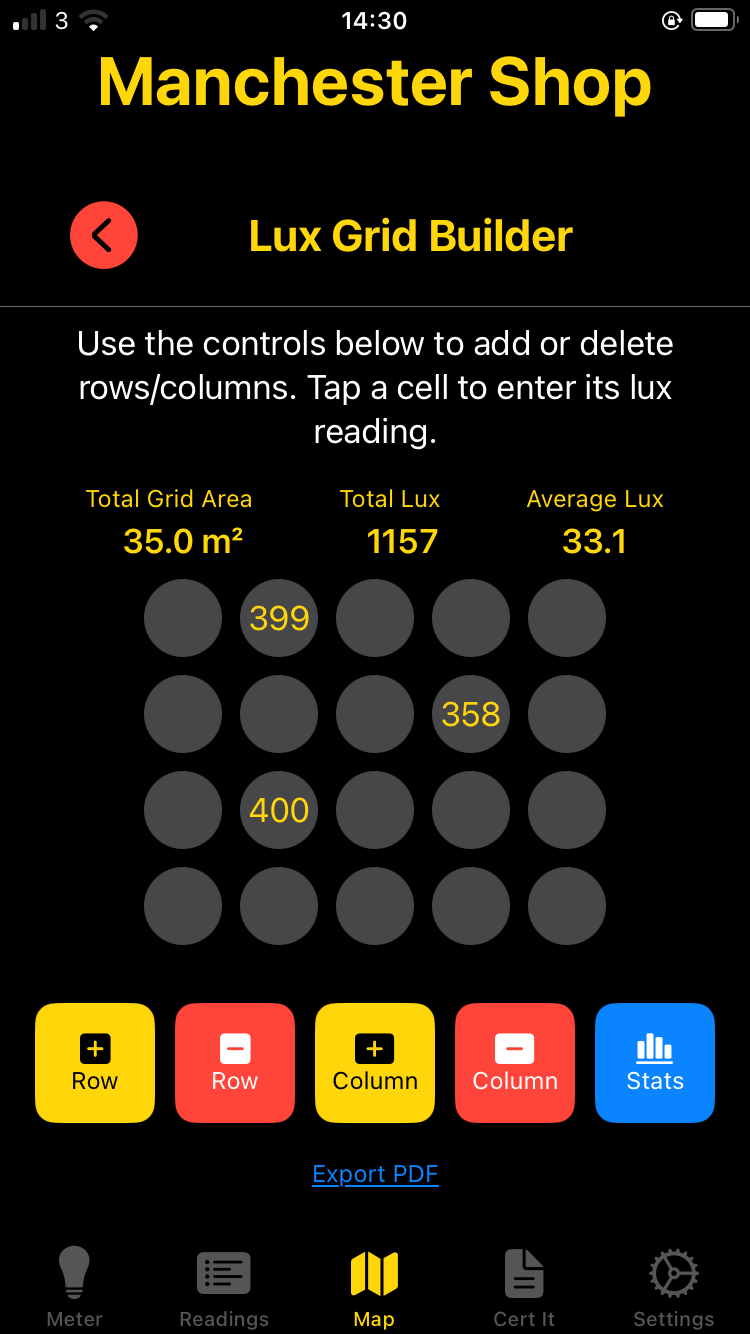
Once your grid is created, open it in the Room Grid view. You can tap any cell, input the measured lux and add a light reference to build a complete lux map of the space.

Room grid view with lux cells in Lux Meter Pro

Interactive cell editing

The RoomGridView uses a dictionary of LuxCell objects (keyed as row_column) to hold your readings. Tapping a cell opens CellInputView, where you can:

  • Select the row/column (automatically shown in the title).
  • Enter a Light reference (fitting ID or location note).
  • Type the measured lux value for that point.
  • Save, which updates the grid in memory and writes back to the CSV file.

You’re not locked to a fixed 8Γ—8 grid. Use the controls at the bottom to:

  • Add or delete rows to cover longer spaces or corridors.
  • Add or delete columns to widen the grid as needed.
  • Switch between square and circle cells for a different visual style.
Long‑press a cell to clear it if you entered the wrong value.
Pinch to zoom the grid in or out for tight or wide overviews.

3. Use Total & Average Lux to Plan Install Locations

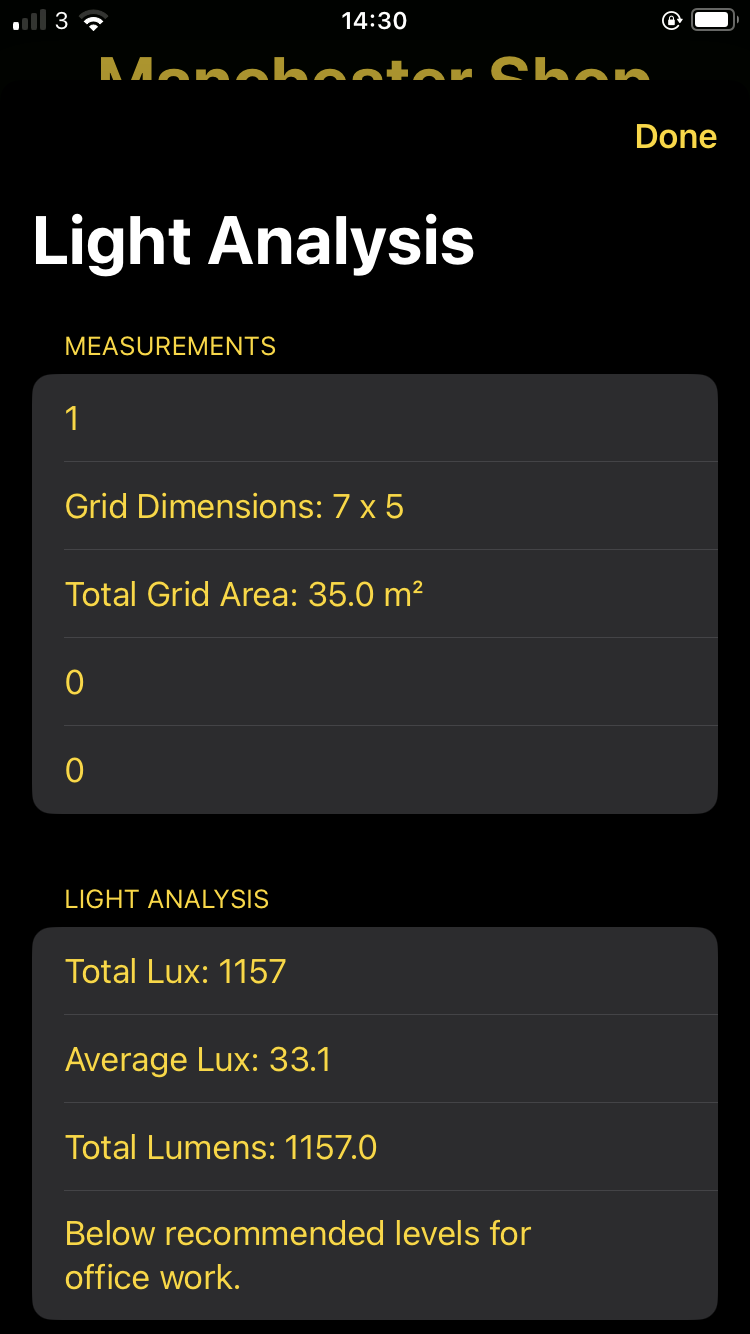
As you fill in more cells, Lux Meter Pro automatically calculates total and average lux, plus grid area. This helps you decide where extra fittings are needed or where you can safely reduce lighting.

Instant stats for design decisions

At the top of RoomGridView, the app shows a live stats bar:

  • Total area – based on the number of rows Γ— columns (assuming 1 mΒ² per cell by default).
  • Total lux – sum of all lux values across the grid.
  • Average lux – total lux divided by the number of populated cells.

With this, you can:

  • Compare actual average lux with the target value from your design or standard.
  • See if a proposed layout meets requirements before committing to final positions.
  • Demonstrate to clients why extra fittings are needed in darker areas.

When you’re ready, tap the PDF export control to generate a heat‑map style PDF:

  • Grid values and layout rendered clearly for reports.
  • Job details (client, address, date) included from your grid metadata.
  • Contractor logo and contact details added from your stored settings.
Lighting grid stats and PDF export in Lux Meter Pro

❓ Frequently Asked Questions

Common questions about lighting grids, lux mapping, and using the room grid feature in Lux Meter Pro.

A lighting grid divides a room into a structured layout of cells, allowing you to record measured lux values at each point. This creates a complete map of light distribution across the space.

Benefits of using lighting grids:

  • Visualise where illuminance is high, low, or meets target levels
  • Identify dark spots that need additional fittings
  • Document compliance with lighting standards (e.g., 500 lux for offices)
  • Generate professional heat map reports for clients
  • Plan new installations with data-driven decisions

Each cell in the grid typically represents 1 square metre. Match your grid dimensions to your room size:

  • Small office (4m Γ— 5m): Use a 4Γ—5 grid
  • Meeting room (6m Γ— 8m): Use a 6Γ—8 grid
  • Warehouse (20m Γ— 30m): Use a 20Γ—30 grid or sample at 2m intervals with a 10Γ—15 grid
  • Corridor: Use a long narrow grid like 2Γ—10 or 1Γ—15

You can add or remove rows and columns at any time, so start with your best estimate and adjust as needed.

Recording lux values is simple and intuitive:

  • Tap any cell in the Room Grid View to open the input screen
  • Position your phone at that location in the room (typically at desk height or 0.85m from floor)
  • Take a lux reading using the main lux meter function
  • Enter the value in the cell input field
  • Add a light reference (optional) to note nearby fittings
  • Tap Save to store the measurement

Pro tip: Long-press a cell to clear it if you entered the wrong value.

Total lux is the sum of all lux values recorded across the entire grid. It gives you an overall measure of the light output in the space.

Average lux is the total divided by the number of cells with values, giving you the mean illuminance level for the room.

Why average lux matters:

  • Compare against required standards (e.g., 500 lux for offices, 300 lux for general areas)
  • Identify if the overall lighting meets design specifications
  • Demonstrate compliance to clients and auditors
  • Plan whether additional fittings are needed

Yes! Tap the PDF export button in the Room Grid View to generate a professional heat map report. The PDF includes:

  • Visual grid layout with all lux values
  • Colour-coded heat map showing light distribution
  • Total and average lux statistics
  • Job reference and client address
  • Survey date and time
  • Your contractor logo and contact details

PDFs are perfect for client presentations, compliance records, and project documentation.

Absolutely! Lighting grids are excellent for documenting emergency lighting illuminance. Here's how:

  • Create a grid for each escape route or open area
  • Switch the building to emergency lighting mode
  • Record lux levels at each grid point along escape routes
  • Verify minimum levels: 1 lux on escape routes, 0.5 lux in open areas (BS 5266-1)
  • Export the PDF as evidence for fire risk assessments

The grid documentation provides clear visual proof of compliance for auditors and enforcing authorities.

Lux Meter Pro offers two visual styles for grid cells:

  • Square cells: Traditional spreadsheet appearance, good for precise layouts and technical documentation
  • Circle cells: Cleaner heat map look, better for client presentations and visual impact

Both display exactly the same data - choose the style that works best for your reports and client preferences. You can switch between them at any time without losing data.

Correcting values is easy:

  • To edit: Tap the cell, enter the new correct value, and save
  • To clear: Long-press the cell to remove the measurement completely
  • To see better: Pinch to zoom the grid for easier selection of specific cells

All changes are saved automatically to your grid's CSV file, so you never lose your work.

Your lighting grid data is stored securely on your device:

  • Grid metadata (job reference, address, dates) saved in grids.json
  • Lux values for each grid saved in individual gridId.csv files
  • Cloud sync available with Professional subscription for backup and multi-device access

You can return to any saved grid at any time, add more measurements, regenerate PDFs, or continue a survey you started earlier.

The basic lighting grid feature is included in Lux Meter Pro. Here's what's available:

  • Free tier: Create grids, record lux values, view totals and averages
  • Professional subscription: Unlimited grids, PDF export with your branding, cloud sync, priority support

Lux Meter Pro is rated 4.9 out of 5 stars by 199 professionals. Try the grid feature today and see how it transforms your lighting surveys!

Still have questions?

Our support team is here to help with any lighting grid questions.

Contact Support

⭐ What Professionals Say About Lighting Grids

Join thousands of lighting designers, electricians and facility managers using Lux Meter Pro's grid mapping tools.

β˜…β˜…β˜…β˜…β˜… 4.9 / 5 from 199 reviews
πŸ† App Store Featured βœ“ Verified Purchases
DT
David Thompson
Lighting Designer, London
β˜…β˜…β˜…β˜…β˜…
"The grid mapping feature is absolutely brilliant for planning office lighting layouts. Being able to see total and average lux across the room helps me spec the right number of fittings every single time. Game changer!"
βœ“ Verified November 2025
SM
Sarah Mitchell
Commercial Electrician, Manchester
β˜…β˜…β˜…β˜…β˜…
"Perfect for surveying existing installations. I map the current lux levels, show the client the dark spots on the heat map PDF, and use it to justify exactly where additional fittings are needed. Professional quality output."
βœ“ Verified October 2025
JW
James Wilson
Facility Manager, Birmingham
β˜…β˜…β˜…β˜…β˜…
"We use the lighting grids to document lux levels across our warehouses for health and safety compliance. The heat map PDFs are exactly what our auditors want to see. Saves us hours of manual documentation."
βœ“ Verified September 2025
EP
Emma Phillips
Interior Designer, Bristol
β˜…β˜…β˜…β˜…β˜…
"Love the flexibility to add rows and columns on the fly. Works perfectly for everything from small home offices to large open-plan retail spaces. The circle cell display looks fantastic in client presentations."
βœ“ Verified September 2025
MR
Michael Roberts
NICEIC Electrician, Leeds
β˜…β˜…β˜…β˜…β˜…
"The average lux calculation instantly shows if a space meets the required 500 lux standard for offices. No more guessing or taking readings in random spots. Systematic, professional, and saves so much time on compliance checks."
βœ“ Verified August 2025
LC
Laura Chen
Energy Consultant, Edinburgh
β˜…β˜…β˜…β˜…β˜…
"Brilliant for energy audits! I use the grids to show clients where they're over-lit and wasting energy. The data is clear, visual, and helps justify LED retrofit projects. ROI presentations are so much easier now."
βœ“ Verified August 2025
PH
Paul Harrison
Fire Safety Officer, Glasgow
β˜…β˜…β˜…β˜…β˜…
"Essential for emergency lighting compliance. I create grids along escape routes, document the lux levels in emergency mode, and the PDF exports prove we meet the BS 5266-1 minimums. Fire risk assessors love the documentation."
βœ“ Verified July 2025
RB
Rachel Brooks
Architect, Cardiff
β˜…β˜…β˜…β˜…β˜…
"Finally a proper tool for validating our lighting designs after installation. The grid feature lets us verify that what we specified on paper actually delivers the right lux levels in the real space. Invaluable for QA."
βœ“ Verified July 2025
NK
Nathan Kelly
Maintenance Manager, Liverpool
β˜…β˜…β˜…β˜…β˜…
"We survey all our buildings annually with the lighting grids. Year-on-year comparison shows lamp degradation and helps us plan replacement schedules. The CSV storage means we can track historical data easily."
βœ“ Verified June 2025
AJ
Amy Jenkins
Health & Safety Advisor, Newcastle
β˜…β˜…β˜…β˜…β˜…
"DSE assessments are so much more thorough now. I grid map each workstation area, identify where glare or insufficient lighting might cause eye strain, and have proper documented evidence. The reports look incredibly professional."
βœ“ Verified June 2025